
Ring & Finger Scanners
Keep both hands on the parts — a Bluetooth finger scanner pairs to your ScanIt Parts handheld and scans in place of the trigger
How It Works
There is no second app and no separate login. The ring is an input device for the scanner you already run.
1. Pair it once
On the handheld, open Settings → External Devices and pair the finger scanner over Bluetooth.
2. Scan with your finger
Press the trigger under your finger. The barcode lands in ScanIt Parts exactly as if you had pulled the trigger on the handheld.
3. Wear the handheld
The handheld still runs the app and shows the screen — on a wrist mount, in a holster, or on the cart. Your hands stay free for parts and totes.
Because the ring scans in place of the device trigger, it works everywhere ScanIt Parts scans: Receive, Returns, Bin Changes, Perpetual Inventory, Part Inquiry, Pick-It, Pack-It and Load-It. Nothing to configure per job.
Ways to Wear It
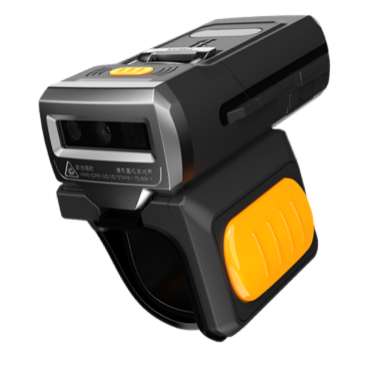
The SR5600 supports three wearing modes, and the ring and glove both fit either hand.
Ring
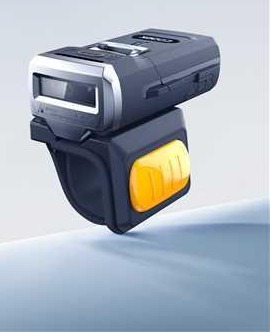
The trigger ring assembly puts the scanner on one finger with the button under your fingertip. Lightest option and the fastest to put on and take off between jobs. Available in orange or black.
Glove
A scanning glove carries the scanner on the back of your hand with its own trigger button. Spreads the weight over a full shift instead of one finger. Ordered left- or right-handed.
Lanyard
Worn on a lanyard when you would rather not have anything on your hand at all — handy for staff moving between the counter and the racks.
Urovo SR5600
The wearable we fit for dealership parts departments.
| Scan engine | 1280 × 1080 CMOS imager at 60 fps, white LED illumination, red cross laser aimer (650 nm) |
|---|---|
| Barcodes | All common 1D and 2D symbologies — QR, Data Matrix, PDF417, Aztec, MaxiCode, UPC/EAN, Code 128, Code 39, Codabar, GS1 DataBar and more |
| Connection | Bluetooth 5.3, range up to 80 m; NFC tap-to-pair |
| Battery | 950 mAh removable lithium-ion — over 20 hours of runtime at room temperature |
| Durability | IP65 sealed against dust and water, 1.8 m drop rating |
| Weight / size | 75 g · 63 × 33 × 19.5 mm |
| Operating range | −20 °C to 50 °C, 5–95% RH non-condensing, works in 0 to 100,000 lux |
| Worn as | Ring, glove or lanyard — ring and glove fit either hand |
| Charging | 4-slot and 20-slot device chargers; 6-slot and 30-slot battery chargers |
Specifications from the Urovo SR5600 product brief and specification sheet. Battery life varies with scan volume and Bluetooth range.
See It In Use
Manufacturer demonstration of the SR5600 hardware, published on YouTube by Scope Link Barcode Technologies. Shown here to illustrate how the wearable is worn and triggered — the software in the video is not ScanIt Parts.
Common Questions
Does it replace my handheld?
No. The handheld still runs ScanIt Parts and shows the screen. The ring replaces the trigger, not the computer.
Can two people share one?
The ring pairs to a handheld, so it follows whichever device it is paired with. Re-pair from Settings → External Devices to move it.
What if the battery dies mid-shift?
The battery is removable — swap it and keep going. The handheld's own scanner still works, so a flat ring never stops the job.
Want to try a finger scanner?
We will talk through which mount suits your counter and how it fits the scanners you already run.