PickIt Order Fulfillment
Handle orders from start to finish. Three picking modes. Zone-based warehouse setup. Real-time tracking. Priority queuing. 15+ reports. Every step uses barcode scan checks.
Currently available for CDK Drive dealers. DealerTrack and AutoMate are on the IPS roadmap. The rest of ScanIt Parts (Receiving, Bin Changes, Cycle Counting, Part Inquiry, POS, Returns) is unaffected. Contact us to be notified when your DMS is ready.
The Problem
- Wrong parts pulled regularly
- No way to manage more than one picker at a time
- Can't see what's been picked vs. what's still waiting
- Techs waiting for parts with no status updates
- No way to track missing parts or shortages
- Paper pick lists get lost or out of date
Our Solution
- Three picking modes: Smart Pick, Pick by Invoice, Pick to Route
- Zone-based picking with dedicated pickers per zone
- Real-time monitor dashboard with live status for every order
- Automatic alerts for new orders, aging picks, and shortages
- Missing parts dashboard with real-time notifications
- 15+ reports with route and employee filtering
Everything You Need for Accurate Parts Picking
Smart Pick
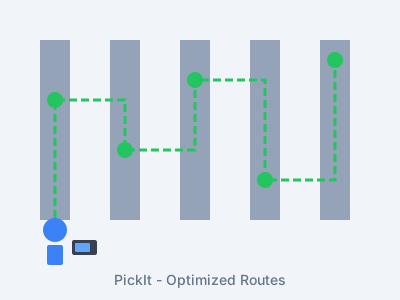
Smart picking that assigns 5 bins and up to 10 parts per picker at a time. Sorted by priority, zone, and best walking path. When a picker finishes, the next batch loads on its own.
Three Picking Modes
Pick the way that fits your team. Smart Pick for guided zone picking. Pick by Invoice for one order at a time. Pick to Route for delivery runs. Switch modes anytime.
Warehouse Zones
Split your warehouse into zones. Assign a picker to each one. Parts go to the right zone on their own. Many pickers work at the same time with no clashes.
Live Monitor Dashboard
See every order in real time. Click any order for full details. Use action buttons for quick tasks. Hide idle orders to focus on active work. Works great on tablets for the warehouse floor.
Priority Management
Set each order to High, Normal, or Low priority. This drives the whole process: pick order, pack order, dispatch speed, and screen display. Urgent orders always go first.
Missing Parts Alerts
Can't find a part while picking? The missing parts screen updates right away. Managers get alerts in real time. Flag parts as not found or short for review.
Duplicate Pick Safeguards
The system stops the same part from being picked twice on one invoice. If a picker walks away, the parts go back into the queue for the next picker.
Configurable Alerts
Set up alerts for new orders, old picks, shortages, and delivery issues. Choose who gets told and when. Keep your team in the loop without watching the screen all day.
15+ Reports
See picking stats, piece counts, and worker output. Run missing parts reports and more. Filter by route, worker, date, or zone. Export to Excel.
How PickIt Works
Order Arrives
Orders from the DMS show up in PickIt on their own. They're sorted by priority, zone, and route. No typing needed.
Pick & Scan
Pickers follow the best route to each bin. Scan every part to confirm it. Smart Pick runs the queue. When you finish, the next batch loads.
Pack & Stage
Picked parts move to PackIt for packing, then to Dispatch for route setup and truck loading. Every stage is tracked with a scan check.
Monitor & Deliver
Track every order on the live screen. Parts flow through to delivery with GPS tracking and proof of delivery at each stop.
What Our Customers Achieve
Almost zero wrong picks. Cut costly rework and tech downtime.
Better routes and scan checks cut picking time by a lot.
Less labor, fewer wrong picks, and less tech downtime waiting for parts.
Techs get the right parts sooner. More ROs done per day.
"PickIt got rid of our picking errors for good. Techs used to gripe about wrong parts every day. Now it never happens. The routing feature alone saved us 2 hours per day in walking time."Carlos Rodriguez Parts Manager, Rodriguez Honda
Picking Is Just the Start
PickIt feeds directly into PackIt, Dispatch, and Delivery. No re-entry, no handoff errors, no separate systems.
Pick
Smart Pick builds the best path. Scan each part to verify. Duplicate checks prevent errors.
Pack
Organize into containers. Verify with a scan. Print box labels. The Packing Station shows what's ready.
Dispatch
Auto-routing assigns invoices to routes. Assign trucks and drivers. Optimize stop order automatically.
Deliver
GPS tracking, proof of delivery, offline manifests. Customers get SMS and email updates at every step.
What the Picker Sees
Every feature works on the handheld scanner. No laptop, no clipboard, no paper lists.
Invoice List
See all invoices waiting to be picked. Filter by ship-via or route. Tap an invoice to see the parts list with bin locations and quantities.
Scan Verification
Scan the part and the scanner confirms it matches the order. Green means correct. Red means wrong part. Audio alerts for mismatches, quantity warnings, and not-found items.
Route Mismatch Detection
If you try to dispatch a part to the wrong route, the scanner shows a confirmation dialog and plays an audio alert. Prevents wrong parts from going on the wrong truck.
Container Selection
Pick into containers right from the scanner. Select a container, scan parts into it, and move on. The Packing Station tracks which parts are in which container.
Print Confirmation
For parts with quantity greater than one, the scanner asks before printing multiple labels. Prevents accidental bulk printing and wasted label stock.
Print History
View and reprint any label from the scanner. No need to go back to the dashboard. Useful when a label gets damaged or lost during picking.
Ready to Transform Your Parts Picking Process?
See how PickIt can end picking errors and speed up parts delivery.